The local version is free forever · No student limit Download →
Halqat logo
Halqat Mosques Quran circle management
The modern system for mosques and Quran associations

Run your memorization circles like a pro,
and record each recitation in seconds

Attendance by scanning a QR card, live recitation where the teacher records reading mistakes with a tap, juz' exams, and an app for parents. Free forever when run locally, and it works without internet on your mosque's network all through daily use.

No required subscription · No bank card · No account to create

Free forever locally

No trial period, no student limit

100% offline

Runs smoothly on the mosque network

QR scan in seconds

A printed card for every student

Excel import and export

Bring in your old records in moments

One connected system

Three pillars that change how you run your circle

The system links the administration, the teacher and the parent in one connected loop: no lost paper registers, no technical hassle.

Pillar one Mosque computer

Server and admin dashboard

Installed on the mosque computer (Windows or Linux). It holds all the circles' data and runs 100% offline on the mosque's local network.

  • Manage students, teachers and groups
  • QR cards from ready templates or your own design
  • Excel and CSV import and export
  • Progress reports and the daily attendance pulse
Free forever locally No subscription
Download the mosque server (Windows / Linux)
For daily use
Pillar two Teacher's phone

The smart teacher app

An Android app that scans a student's card in seconds and records recitation by page, or by tapping each reading mistake as the teacher listens.

  • Instant QR scan for attendance and lateness
  • Live recitation: record memorization, vowel and tajweed mistakes with a tap
  • Juz' exams with attempts and scores
  • Works over the mosque's local network, no internet
Free forever locally Android 8+
Download the teacher app (APK)
Pillar three Parents

Parent app and service

A steady link between home and mosque: parents follow their child's attendance and progress through a private link, and get WhatsApp reports from the circle's administration.

  • Today's attendance status in the app
  • A WhatsApp report per student with recitation results (free)
  • Juz' exam results
  • An Android app that opens the student's report from a private link sent by the mosque
App included in the cloud version Optional subscription
See the parent app →
A live hands-on demo with sample data

Interactive demo studio

Try the teacher app, the admin dashboard and the parent app yourself, before you download anything.

The screens inside the demo show the real Arabic interface: the admin dashboard and the results screen are in Arabic, and the teacher app also runs in English.

An interactive sandbox: tap and try anything
Circle type:

The teacher app: in your hands at the mosque

Teachers use the app on their Android phone with no internet connection: it talks directly to the mosque computer over Wi-Fi.

Pick a feature to try on the screen:
Safe and instant

An attendance scan takes seconds, with an instant undo for the last record.

08:15
مسجد التقوى 100%
تسجيل حضور الطلابتسجيل حضور الطالبات
وجّه الكاميرا لرمز QR الخاص ببطاقة الطالبالطالبة
اضغط على الزر بالأسفل لتجربة المسح
Smart contact between mosque and family

The parent app:
Your children are safe, and their memorization keeps growing

No more asking “Did you recite today, son?”. The mosque sends the parent today's report on WhatsApp with a private link for their child, which opens in the browser or in the parent app to follow attendance, recitation and exam results.

Daily attendance status

Parents see in the app whether their child is present, late or absent today.

A WhatsApp report per student

Sent by the administrator from the dashboard after a preview: attendance, the latest recitation and its rating, and the parent's follow-up link.

Juz' exam results

Each juz' exam's score out of 100, with pass or fail.

Memorization statistics

Total pages memorized, pages rated excellent, and juz' passed.

Ask to turn on the parent service The parent app comes with the managed cloud subscription; the manual WhatsApp report is free in the local version
حلقة مسجد التقوى القرآنية رسالة من إدارة الحلقة
08:16 م

السلام عليكم ورحمة الله وبركاته،

📊 تقرير إنجاز الطالب: أحمد محمد عباس

📍 حالة الحضور:حاضر ✅
📖 آخر تسميع وإنجاز:صفحات (592 - 594) [3 ص] (الجزء الثلاثون) - تقدير: ممتاز ⭐
🕌 المركز / المسجد:جامع التقوى

🔗 رابط المتابعة المباشرة لولي الأمر:
…/parent?m=…&s=…&t=…

بارك الله فيكم وفي جهودكم وحفظكم الله.

08:16 ✓✓
Parent app for Android, turned on with the cloud service No ads
The complete feature guide

Everything your circle needs, in one place

Explore 65 features for running memorization circles, from attendance and recitation to reports and the parent app.

Instant attendance

Fast, accurate attendance for students and teachers

  • Scan a QR card to record a student's attendance in seconds
  • Attendance states: present, late, absent, excused absence
  • Lateness counted automatically on scan, from a time you set in the settings
  • An undo button after an attendance scan, and undo of a recitation session after saving
  • Teacher attendance (present, late, absent or excused) recorded from the teacher app by whoever has the permission
  • Record a whole circle's attendance at once from the admin dashboard
  • Correct any student's attendance on any day from the attendance grid in their profile

Memorization, rating and live recitation

Tools to follow reading quality and the mastery of every page

  • Record the pages recited in each session, with a full archive
  • Rating by level: excellent, very good, good, or not accepted
  • Live recitation: the teacher records memorization, vowel, tajweed and hesitation mistakes with a tap on the screen
  • Automatic deduction with weights the administrator sets per mistake type, and adjustable acceptance limits
  • An optional waiting time between two sessions to stop random repeats
  • A custom memorization order for each student (from the first juz' or from Juz' Amma)
  • Juz' Amma with its 37 surahs for young beginners
  • Record a past-dated recitation (with a level rating) or an exam with its score from the admin dashboard
  • Edit any page's rating or delete a wrong record from the student's profile

Juz' exams and mastery

A careful method to measure how well memorization holds

  • An exam for each juz': the teacher enters the score, or the app calculates it from reading mistakes
  • An adjustable pass mark to fit each season's policy
  • An optional waiting time between attempts, and the juz' repeated once the allowed attempts run out
  • A list of students who finished a juz' and are waiting for its exam
  • Attempt scores in the student's profile and their dates in the exams report, with deletion of a wrongly recorded attempt
  • Automatic count of completed juz' and of students who finished the whole Quran

Full administration and control

Everything a mosque manager needs to keep the circles on track

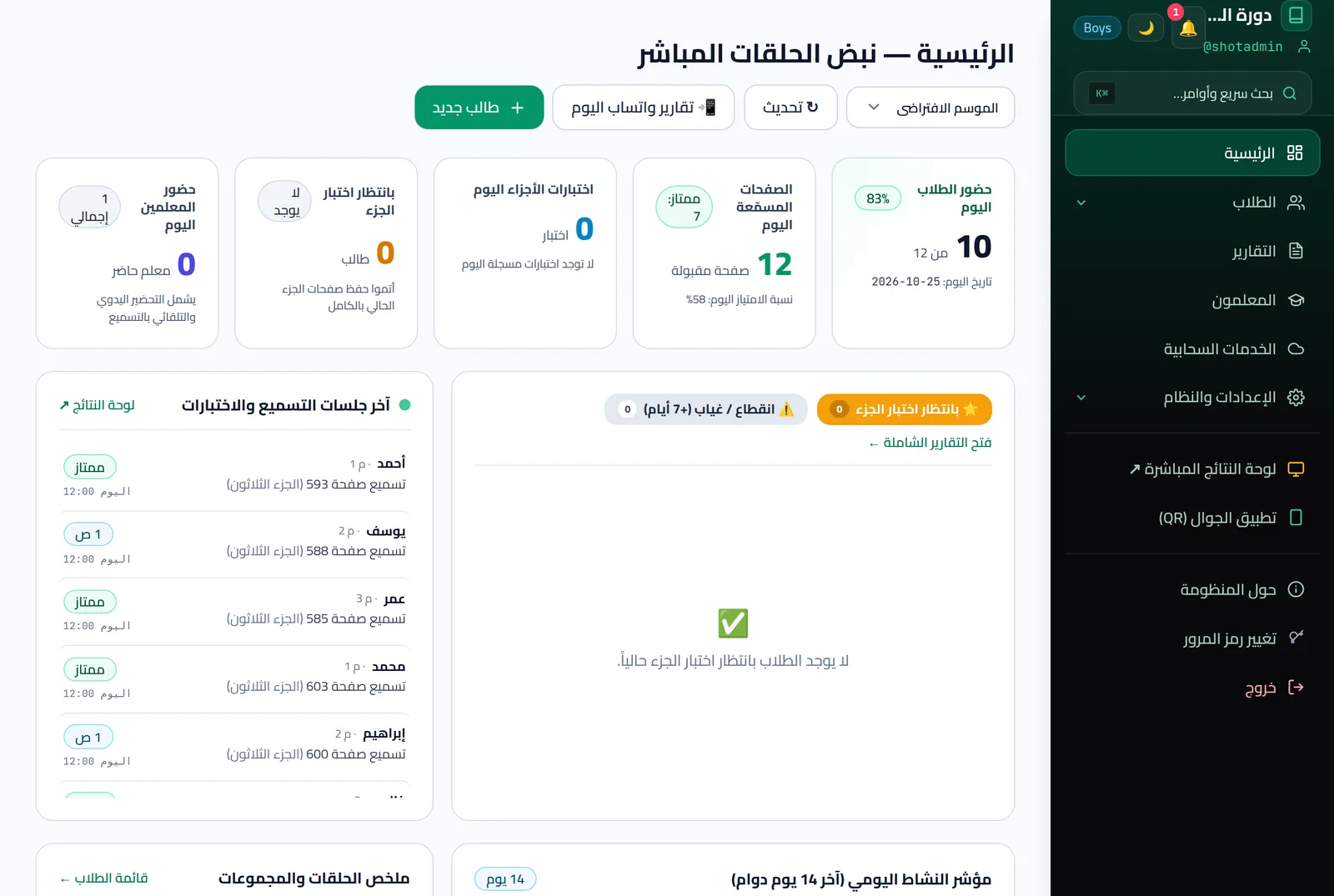
  • Home dashboard: circle pulse, latest sessions, a summary per circle, and today's teacher attendance
  • Extended student profile: health status, family situation, parents' WhatsApp numbers, previous school and grade
  • Students in groups (number and name), with instant search and filters
  • Smart Excel import: a ready template, automatic column matching, preview before saving, and duplicate handling
  • Export students and teachers to Excel or CSV with one click
  • QR card designer: five ready templates or your own design from an uploaded image; drag the QR code and fields anywhere, and change the card size, QR size and fonts
  • Six permissions the administrator grants each teacher (attendance, recitation, juz' exams, statistics, teacher attendance, administration), each tied to a season if needed, except administration
  • Disable a teacher account or reset its sign-in code to 000000, keeping all its records
  • Seasons (good for summer courses) with their own rules for rating mode, waiting time and exam pass mark, plus archiving, locking a season and moving students between seasons
  • Add students and teachers and change permissions from the teacher app too

Reports, follow-up and statistics

Accurate data and charts to support decisions

  • Reports: juz' progress, student results, student and teacher attendance, exams, and an overview
  • Print or save as PDF from the print window, with a header showing the mosque name, report title and period, and CSV export with the columns you choose
  • Recitation quality indicators and rating mix per student and per course, and a table comparing circles by pages, attendance and pass rate
  • A chart of daily circle activity, and statistics for any period
  • Student profile: rank, season history, and charts of pages and ratings
  • An alert on the home dashboard for students with no attendance, recitation or exam for 7 days or more (up to 20 students), with a WhatsApp follow-up button
  • Statistics in the teacher app: top 10, daily records, and a search for any student

Results screen and motivation

An honor board on the mosque screen that sparks healthy competition

  • A public honor board shown on the mosque screen, with no sign-in
  • A live feed of today's progress that updates the moment a recitation is recorded; the other periods refresh every 25 seconds
  • Weekly, monthly and all-time rankings, by pages or by juz'
  • A podium for the top students, a filter by circle, and full-screen mode
  • The list of students who completed the whole Book of Allah in the reports, and each student's juz' count on the honor board

Flexible settings for your mosque

Set the system up your way, not the other way round

  • Hide dashboard sections you don't need: juz' exams, leaderboard, teacher attendance, cards
  • Choose which fields are required when registering a student
  • Teaching staff title: Sheikh, Ustadh, Teacher, Murabbi, or your own
  • An announcements center with categories (general, exam, event, holiday, urgent), with pinning for important ones
  • Teacher app connection page: a QR code to connect, the app download from the internet or from the mosque server, and a ready invitation message
  • Quick search and navigation in the admin dashboard (Ctrl+K)
  • Dark mode in the admin dashboard and the teacher app, and the teacher app in Arabic or English
  • Sign-in protection: a temporary lock after failed attempts, and an adjustable session length

Security, cloud and the family app

Protected data, backups and flexible ways to run it

  • Runs 100% locally without internet on the mosque network
  • Automatic hourly backup while the server runs, an extra copy to any folder or drive you choose, and restore from a backup file in the admin dashboard
  • Today's report to each parent on WhatsApp for free, student by student, with a message preview
  • Bulk WhatsApp sending from the server through a messaging gateway (needs linking and activation) Subscription
  • Parent app (Android) and a family web page that works on any phone, opened with a private link per student Subscription
  • A managed cloud version with a separate database per mosque and an encrypted connection Subscription
  • Automatic daily cloud backup with restore, even if your server stays local Subscription
  • Support, updates and help tickets, with diagnostic logs sent to support in one click Subscription

Full support for boys' and girls' circles

Complete privacy and independence for each group

  • A separate server per course, or boys' and girls' seasons on one server
  • Automatic feminine wording in the Arabic interface (الطالبة، المعلمة)
  • Separate number codes: M for boys and F for girls
  • Card colors for each course
  • Blocks moving a student between boys' and girls' seasons by mistake
Very simple

Up and running in 3 simple steps

No technical expertise needed. Three clear steps stand between you and your first recitation session.

1

Download and start the server

Download the server file on the mosque computer (Windows or Linux), unzip it, then double-click start-quran-server.bat (or start-here.sh on Linux). The system then starts.

No external database to install
2

Add students and print the cards

Open the admin dashboard in the browser, import your students' names from an Excel or CSV file, then print the QR cards, ready to cut and hand out.

10 cards on a plain A4 sheet
3

Connect the teacher app and start

Teachers install the Android app on phones connected to the mosque's Wi-Fi, and start scanning cards and recording recitation right away!

Works locally even when the internet is down
Mosque computer requirements: Any laptop or desktop running Windows 10/11 (64-bit) or Linux x64 (Ubuntu 20.04 / Debian 11 or later).
Teachers' phones: Any smartphone with Android 8.0 or later and a camera to scan QR codes.
Fully transparent, no hidden terms

Free version or cloud?

Compare the two and pick what fits your mosque's means and budget. You can start free and upgrade at any time.

The independent option No subscription

Local version

Free forever

Install it on the mosque's own computer. No internet needed, and students' data never leaves the mosque.

Attendance, recitation and exams for unlimited students
Works offline in daily use
Generate and print QR cards, import from Excel
Free updates download automatically when the server starts, if the computer is online
Download the free version now No credit card or account needed
For mosques that want complete peace of mind
Managed cloud service Every feature included

Cloud subscription

Contact us Based on the size of the mosque and its circles

We host and run the server for you, and turn on the parent app and bulk WhatsApp reports.

Parent app: follow the student's attendance and recitation from the phone
Bulk WhatsApp reports: sent to parents through a messaging gateway instead of by hand
Dedicated support: circle setup and teacher training
Ask for a consultation or subscription We help you work out what your circle needs

Or stay local and link your server to the cloud

You don't have to move fully to the cloud: the server stays on the mosque computer and works locally even without internet, and syncs with the cloud when a connection is available.

  • An automatic cloud backup once a day while the server runs
  • Restore the data from the cloud if the computer breaks
  • Daily work stays local and fast
  • Turned on once the mosque is linked and subscribed to cloud backup
Ask about linking

Detailed comparison

Point by point, for every part of the system

Item / feature Free local version Managed cloud version
Cost and license 100% free forever Monthly or yearly subscription (contact us for the price)
Where it runs The mosque computer (Windows or Linux) Fully managed cloud (no hardware)
Internet connection Not needed for daily use Needs a steady connection
Students and teachers Unlimited Unlimited
QR scanning and attendance Fully included Fully included
Live recitation and mistake tracking Fully included Fully included
Juz' exams and statistics Fully included Fully included
Excel and CSV import and export Fully included Fully included
QR cards (ready templates or custom design) Fully included Fully included
WhatsApp reports to parents Sent by hand, student by student, through WhatsApp Sent in bulk through a messaging gateway (needs linking and activation)
A dedicated app for the parent's phone Not available Included (Android and a web page, with a private link per student)
Support and remote setup Self-service guide and general advice Direct support and help running it
Upgrade from local to cloud Yes, or stay local and link to the cloud Yes, export your data at any time
Clear, direct answers

Frequently asked questions

The questions imams and Quran circle supervisors ask us most.

Is the free version limited in time, students or teachers?

Not at all. The local version is 100% free forever, with no limit on students, circles or teachers. You run your own server on the mosque computer, with no subscription and no expiry date.

Does the system need a constant internet connection?

The local version needs no internet at all while the circles run each day. An ordinary local Wi-Fi network in the mosque is enough for the teacher's phone to reach the mosque computer. If the computer is online when you start the server from its launcher (start-quran-server.bat or start-here.sh), free updates download automatically; without internet, the installed version runs as it is. The first download of the system does need internet.

What hardware does the mosque need?

You need: 1) any computer (desktop or laptop) running Windows or Linux in the mosque. 2) an ordinary Wi-Fi router in the mosque. 3) an Android phone (8.0 or later) for each teacher, to install the teacher app and scan the cards.

How is the managed cloud version different from the local version?

In the cloud version we host the server for you on secure cloud servers, so the mosque needs no computer. It also turns on the parent phone app, bulk WhatsApp reports to parents through a messaging gateway instead of sending them one by one, and an automatic daily backup of the mosque's data.

Is our students' and mosque's data safe?

In the local version your data stays entirely on the mosque computer, and never goes to an outside server unless you choose to link the server to the cloud. In the cloud version each mosque has its own separate database that never mixes with another mosque's data, and the connection to it is encrypted (HTTPS). Your data belongs to your mosque: you can export the database, student lists and reports at any time from the admin dashboard.

Which Mushaf or recitation does the system follow?

The system does not depend on any particular Mushaf or recitation, because the teacher app does not display, write or change the text of the Holy Quran. The teacher follows the student's recitation from the printed Mushaf your circle uses, and the app only records the page, the rating and the mistakes. So the Quranic text and the recitation stay in the hands of the circle and the teacher alone.

Can a teacher use an iPhone?

The teacher app is currently available for Android (8.0 or later). The admin dashboard is a web page that opens in the browser of any device on the mosque network, including iPhone, iPad and Mac.

Can we stay on the local version with a cloud backup?

Yes. The server stays on the mosque computer and keeps working locally, even without internet, and you can link it to the cloud so it syncs whenever a connection is available. A backup of the mosque's data is then uploaded to the cloud automatically once a day while the server runs. If the computer breaks or is replaced, you restore it from the admin dashboard by choosing the backup and restarting the server. This needs the mosque linked to our account and an active subscription.

Can we move our data if we start local and later upgrade to the cloud?

Yes, easily. You export the mosque's database with one click from the admin dashboard, and we move it to the cloud version without losing any past attendance or recitation record.

Can we print QR cards with our mosque's own design?

Yes. Besides the five ready templates, you can upload your own card design as an image, then drag the QR code, the student's name and number, the group and the mosque name wherever you want on it. You control the card size (landscape, portrait or custom millimetres), the QR code size and each field's font size. Then you pick the students (or all of them in one click), and the cards fill in automatically and print ready to cut.

Can we import and export student data with Excel files?

Yes. The system imports student and teacher names and details in one go from an Excel or CSV file. It also exports student and teacher lists to Excel, and attendance reports and statistics as CSV files that open in Excel.

Have another question that isn't answered here? Ask us through the form or by email

Ask for advice that fits your mosque

Answer a few short questions; your message reaches our inbox with the details, and we reply with what suits your circle.

The site doesn't store this information; it only reaches our inbox and we use it to reply to you. Or email us at support@halqat.app.

Start today: the reward begins with the first verse your student recites

Spend less time checking paper registers and more on teaching the Book of Allah. Download the system free for your mosque now.

﴿ إِنَّ هَٰذَا الْقُرْآنَ يَهْدِي لِلَّتِي هِيَ أَقْوَمُ ﴾

Free download Contact